Continuous Integration (CI) is a crucial part of modern software development where code changes are automatically built and tested whenever they’re integrated into a shared repository. This tutorial will guide you through setting up GitHub Actions to automatically build and run unit tests for a Golang application using PostgreSQL.
In this tutorial, we’ll set up GitHub Actions for a Golang application that uses Postgres as its database. The workflow will:
- Spin up a Postgres container.
- Run database migrations.
- Execute automated tests.
1. What is GitHub Actions?
GitHub Actions is a CI/CD service provided by GitHub. It allows developers to automate workflows such as building, testing, and deploying applications. Inorder to used Github actions, we need to define workflows. Workflows are defined in YAML files inside the .github/workflows folder of your repository.
2. Understanding GitHub Actions key concepts
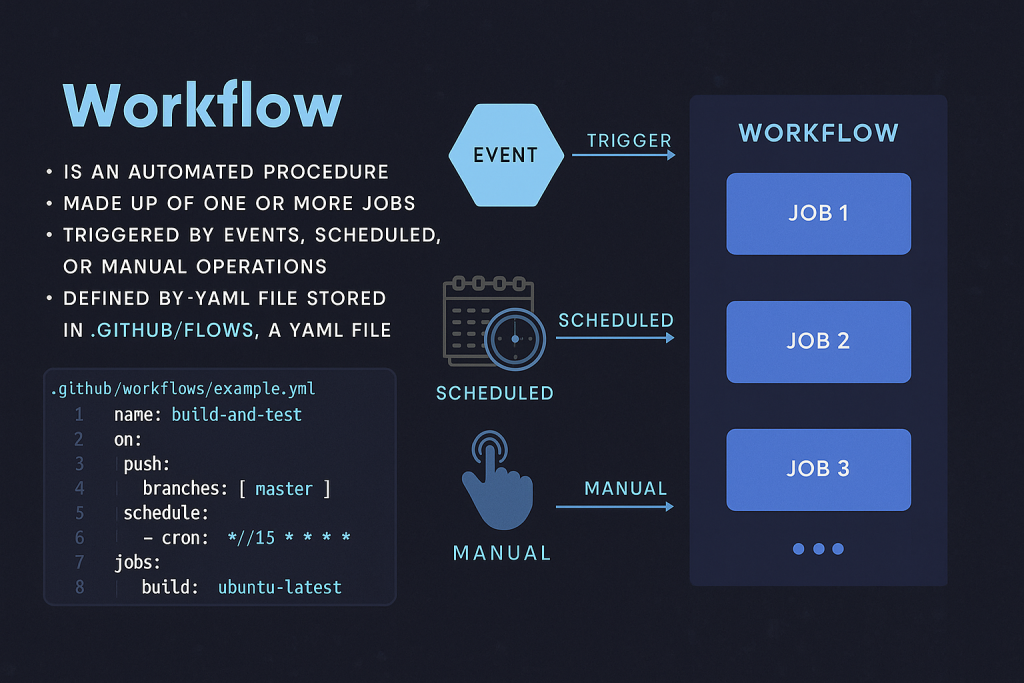
GitHub Actions automates workflows using YAML configuration files. Key components:
Workflows
- An automated procedure consisting of one or more jobs.
- Defined in YAML files under
.github/workflows/directory - Can be Triggered by events (e.g.,
push,pull_request), schedules, or manually.
Jobs
- A set of steps executed on the same runner
- Normally job are run in parallel by default, but can be run serially when jobs have dependence on each other.
Steps
- Individual tasks that run sequentially within a job
- Can contain one or multiple actions
- Can use pre-built actions (e.g.,
actions/checkout@v2) or custom commands.
Actions
- Standalone commands or reusable units of code
- Can be custom or from the GitHub Actions marketplace
Runners
- Servers that execute your jobs
- GitHub provides hosted runners (Ubuntu, Windows, macOS)
- You can also use self-hosted runners
3. How are Workflows Triggered?
Workflows can be triggered in three ways:
1. **By an event** that occurs in the GitHub repository (e.g., a push to a branch).
2. **By a repetitive schedule** (e.g., running every 15 minutes).
3. **Manually** by clicking the “Run workflow” button in the repository’s UI.
To create a workflow, you need to add a YAML file to the `.github/workflows` directory in your repository.
Prerequisites
Before starting, ensure you have:
- A Golang project with unit tests
- A PostgreSQL database schema
- Database migration files
- A Makefile with
testandmigrateupcommands - Your project hosted on GitHub
4. Setting Up the GitHub Actions Workflow
Now, let’s set up a real workflow for our Golang application that connects to a Postgres database and runs unit tests that we’ve written in previous lectures whenever new changes are pushed to GitHub.
Before jumping to first step, let first create intial action tab, to copied it dummy data for our references. In our SimpleBank GitHub repository in Github site, let’s select the Actions tab. GitHub knows that our project is written mainly in Go, so it suggests we set up the workflow for Go. Let’s click this setup button, and it will create a new file go.yml under the .github/workflows/ folder of our repository.
We can edit the file simplebank/.github/workflows/go.yml directly here using GitHub’s editor, but we’ll leave it as is. However, I prefer to add the file to our local repository first, then edit it locally with Visual Studio Code before pushing to GitHub.
In our local SimpleBank project in Visual Studio Code, create a new folder .github/workflows/ci.yml and create a new YAML file for our workflow inside this folder. You can name it whatever you want, just make sure it has a .yml extension. Let’s create ci.yml to keep it simple.
Step 1: Creating the Workflow File
1. In your project’s root directory, create a new directory named `.github/workflows`.
2. Inside this directory, create a new YAML file named `ci.yml`.
Now copy the generated workflow from go.yml from Github respository site to our new ci.yml file in Visual Studio Code. First, we need to set a name for this workflow, for example: ci-test. This name will be displayed on our GitHub repository’s Actions page.
Then we define the events that can trigger this workflow and the jobs. We have several steps in this job. The first step is to set up and install Go into the runner.
In your repository, create .github/workflows/ci.yml and all its configuration are add according to the our Makefile in our project.
Here is an example of a workflow file named ci.yml file
name: ci-test

# Define when workflow should be triggered
on:
  push:
    branches: [master, main]
  pull_request:
    branches: [master, main]

jobs:
  test: #Job name, we change from build to test
    runs-on: ubuntu-latest

    # Define external services needed for job
    services:
      postgres:
        image: postgres:16

        env:
          POSTGRES_PASSWORD: secret
          POSTGRES_USER: root
          POSTGRES_DB: simple_bank
        options: >-
          --health-cmd pg_isready
          --health-interval 10s
          --health-timeout 5s
          --health-retries 5
        ports:
          - 5432:5432

    steps:
      - uses: actions/checkout@v4
      # Step 1: Setup Go environment
      - name: Set up Go
        uses: actions/setup-go@v4
        with:
          go-version: "1.24.5"

 # Step 2: Install golang-migrate CLI tool for ubuntun from offical golang migrate github site
      - name: Install golang-migrate
        run: |
          curl -L https://github.com/golang-migrate/migrate/releases/download/v4.18.3/migrate.linux-amd64.tar.gz -o migrate.tar.gz
          tar -xzf migrate.tar.gz
          sudo mv migrate /usr/local/bin/

      # Step 3: Verify the migration
      - name: Verify migrate install
        run: migrate -version

   # Step 4:Wait Postgres to be ready to avoid
       - name: Wait for PostgreSQL to be ready
        run: |
          until pg_isready -h localhost -p 5432 -U postgres; do
            echo "Waiting for PostgreSQL..."
            sleep 1
          done

  # Step 5: Run database migrations
        - name: Run migrations
        env:
          DB_SOURCE: postgresql://postgres:mysecretpassword@localhost:5432/simple_bank?sslmode=disable
        run: make migrateup

      # Step 6: Run tests
      - name: Run tests
        env:
          DB_SOURCE: postgresql://postgres:mysecretpassword@localhost:5432/simple_bank?sslmode=disable
        run: make test
In this example:
- The workflow is named `ci-test`.
- It is triggered by a push to the `main` branch.
Explanation of the Workflow
name: ci-test`**: Sets the name of the workflow.
on: Defines the events that trigger the workflow (a push or pull request to the `master` branch).
jobs: Defines the jobs to be executed.
test: The name of the job.
runs-on: ubuntu-latest: Specifies that the job will run on the latest version of Ubuntu.
services: Defines external services to be run with the job.
postgres: The name of the service.
image: postgres:16: Specifies the Docker image to use for the service.
env: Sets environment variables for the service based on oue Makefile in the project .
ports: Exposes the service’s port to the host.
options: Configures a health check for the service.
steps: Defines the steps to be executed in the job.
Set up Go: Installs Go on the runner.
Check out code: Checks out the repository’s code.
Install golang-migrate`**: Downloads and installs the `golang-migrate` CLI tool.
Run migrations: Runs the database migrations.
Run tests: Runs the unit tests.
Note:
1. Search for “GitHub Actions Postgres” in Google to get information on how to declare a Postgres service in the job.
2. The options field in the ci.yml file is used to set health checks to wait until Postgres has started. This is for the runner to check if Postgres has started successfully or not, so it can know when to run the next steps in the workflow. We want to run the tests after Postgres has started successfully.
3. We also need to run database migrations to create the correct database schema for our application.
4. This configuration triggers the workflow on:
- Pushes to master/main branches
- Pull requests targeting master/main branches
Key points:
- Uses PostgreSQL 16 Docker image
- Sets up database credentials and default database name
- Includes health checks to ensure PostgreSQL is ready before running tests
- Exposes port 5432 to the runner environment.
5. Deploy the Workflow
- Add the files to your repository:
git add .github/
git commit -m "Add GitHub Actions CI workflow"
git push origin main- Navigate to your GitHub repository site and click on the “Actions” tab
- You should see your workflow running automatically
6. Monitoring and Debugging
Viewing Workflow Runs
- Go to the “Actions” tab in your repository
- Click on any workflow run to see detailed logs
- Each step shows individual logs and status
Common Issues and Solutions
- Migration Tool Not Found
- Ensure the migration tool is properly installed and moved to
/usr/bin/ - Verify the download URL and version
- Ensure the migration tool is properly installed and moved to
- Database Connection Issues
- Check that PostgreSQL service is properly configured
- Ensure port mapping is correct (5432:5432)
- Verify database credentials match your application configuration
- Test Failures
- Review test logs in the workflow output
- Ensure all dependencies are properly installed
- Check that database schema matches test expectations
Advanced Configuration Options
Caching Dependencies
Speed up builds by caching Go modules:
name: Cache Go modules
uses: actions/cache@v2
with:
path: ~/go/pkg/mod
key: ${{ runner.os }}-go-${{ hashFiles('**/go.sum') }}
restore-keys: |
${{ runner.os }}-go-
Secrets Management
Store sensitive information in GitHub Secrets:
env:
  DB_PASSWORD: ${{ secrets.DB_PASSWORD }}