1. Introduction: The Challenge of Deadlocks
When working with database transactions, one of the most challenging issues is handling deadlocks. This tutorial demonstrates how to prevent deadlocks by implementing consistent query ordering patterns, using a practical money transfer example.
This lesson will teach you:
- What a deadlock is.
- How query ordering impacts deadlocks.
- How to implement consistent lock acquisition order.
- How to refactor code for cleaner transaction logic.
1. What is a deadlock?
From experience, the most effective way to handle deadlocks is to avoid them in the first place or minimize it chance of occurance. This involves carefully designing your application logic and database queries to prevent deadlock scenarios from ever occurring.
Key Takeaway:
The best way to handle deadlocks is to avoid them by ensuring transactions acquire locks in a consistent order.
2. The Deadlock Scenario: A Bank Transfer
In the previous tutorial, we learned how to fix deadlock issues caused by foreign key constraints. However, if we examine the code in db/sqlc/store_test.go of previous tutorial carefully, we can identify a potential deadlock scenario.
In our previous tutorial, we already had a test that runs 5 concurrent transfer transactions with the same pair of accounts, but deadlock doesn’t occur, right? During money transfers, we’re updating the balance of both the from-account and to-account, and we know that both operations require an exclusive lock (X-lock) to perform the UPDATE operation in one direction.
If two concurrent transactions involve the same accounts but in opposite directions—one from account1 to account2, and the other from account2 to account1—they can block each other and cause a deadlock. Let’s demonstrate this using two transactions in TablePlus.
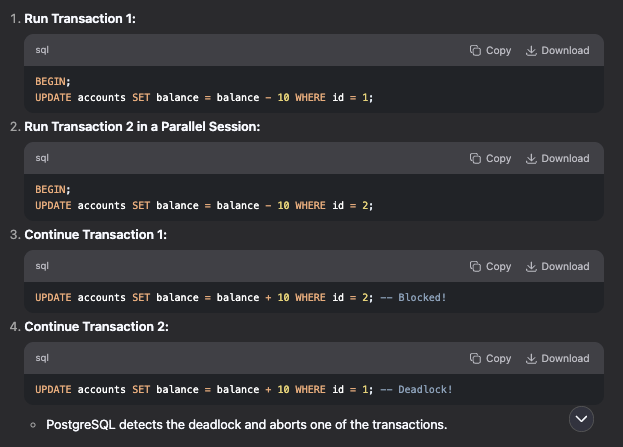
We can see that in Step 3 where Transaction1 query is blocked this is because the transaction2 also updating the same account. Now Step4 when we run query in transaction 2 to update the account1 balance we get deadlock, because the account1 is being updated by transaction1.
In previous tutorial we had query to check the detail lock information by running the query in tableplus.
Run 10 transactions, the idea is to have 5 transactions that send money from account1 to account2 and other five transactions that send many in reverse direction that is account2 to account1.
3. Simulating Deadlocks in Go in store_test.go by creating new function
In this section we only need to check for deadlock error, we don’t need to care about the result because it has already been check in the other test.
func TestTransferTxDeadlock(t *testing.T) {
store :=NewStore(testDB)

account1 := createRandomAccount(t)
account2 := createRandomAccount(t)

amount :=int64(10)
errs := make(chan error)

// Run 10 concurrent transactions (5 in each direction)
for i := 0; i < 10; i++ {
  fromAccountID := account1.ID
  toAccountID := account2.ID

  if i%2 == 1 {
   // Reverse direction for odd-numbered transactions
     fromAccountID = account2.ID
     toAccountID = account1.ID
  }

  go func() {
    _, err := store.TransferTx(ctx, TransferTxParams{
       FromAccountID: fromAccountID,
       ToAccountID:   toAccountID,
       Amount:        amount,
   })
   errs <- err
  }()
}

// check results
for i := 0; i < n; i++ {
    err := <-errs
    require.NoError(t, err)
}

// check the final updated balance
updatedAccount1, err := store.GetAccount(context.Background(), account1.ID)
require.NoError(t, err)

updatedAccount2, err := store.GetAccount(context.Background(), account2.ID)
require.NoError(t, err)

fmt.Println(">> after:", updatedAccount1.Balance, updatedAccount2.Balance)

require.Equal(t, account1.Balance, updatedAccount1.Balance)
require.Equal(t, account2.Balance+int64(n)*amount,   updatedAccount2.Balance)
}
Expected Result:
Now running this test, the Deadlocks occur because when transactions update accounts in different orders. Tx1 is waiting for Tx2, and Tx2 is waiting for Tx1. This is a classic deadlock.
4. The Solution: Enforce a Consistent Lock Order
The reason the deadlock occurs is the inconsistent order in which the transactions acquire locks. Tx1 locks Account 1 then 2, while Tx2 locks Account 2 then 1.
The solution is to ensure that no matter which direction the transfer is going, our application always acquires locks in a consistent order.
A simple and effective way to achieve this is to use the primary key (the account ID) to dictate the order. For any given pair of accounts, we will always update the account with the smaller ID first. Here our previous example if we change the order of the udpate of
#changig the order of this update query will fixed the deadlock
UPDATE accounts SET balance = balance + 10 WHERE id = 1;
UPDATE accounts SET balance = balance + 10 WHERE id = 2;
Where the smallest id UPDATE is always perform first to avoid deadlock. Here is our full code of two transactions running parallel.
1. Run Transaction 1:
BEGIN;
UPDATE accounts SET balance = balance - 10 WHERE id = 1;
Run Transaction 2 in a Parallel Session:

2. Run Transaction 2 in a Parallel session:
BEGIN;
UPDATE accounts SET balance = balance - 10 WHERE id = 2;


3. Continue Transaction 2:
UPDATE accounts SET balance = balance + 10 WHERE id = 1;

4.  Continue Transaction 1:
 UPDATE accounts SET balance = balance + 10 WHERE id = 2;
Solution: Always Lock Rows in a Consistent Order
- Modify the transaction logic to always update the account with the smaller ID first.
- Then update the account with the larger account ID.
- This ensures all transactions follow the same locking sequence.
This guarantees:
- No cyclic waiting.
- Transactions may still block temporarily but will complete without deadlock.
Here is db/sqlc/store.go to transfer money between two acount. Check full code in github. Now based on solution to avoid deadlock.
Let’s refactor db/sqlc/store.go by adding an if condition to check which account ID (from or to) is smaller. Based on the smaller ID, we perform the operation first to prevent deadlocks, as we learned earlier. In the code below, the modified lines for deadlock prevention are highlighted in font weight bold.
...
func (store *SQLStore) TransferTx(ctx context.Context, arg TransferTxParams) (TransferTxResult, error) {
//Step 1: create empty transfer record
  var result TransferTxResult

  err := store.execTx(ctx, func(q *Queries) error {
     var err error

//Transfer record fr single database transaction
result.Transfer, err = q.CreateTransfer(ctx, arg.toCreateTransferParams())

if err != nil {
  return err
}

//From account to subtract money
result.FromEntry, err = q.CreateEntry(ctx, CreateEntryParams{
  AccountID: arg.FromAccountID,
  Amount:    -arg.Amount,
})
if err != nil {
  return err
}

//To account to add money
result.ToEntry, err = q.CreateEntry(ctx, CreateEntryParams{
  AccountID: arg.ToAccountID,
  Amount:    arg.Amount,
})
if err != nil {
  return err
}

//Update accounts' balance, logic to avoid deadlock and lock
// get accout from -> update accounts balance
// To avoid deadlock, order of account id important

if arg.FromAccountID < arg.ToAccountID {
  // Move money out of account 1
  result.FromAccount, err = q.AddAccountBalance(ctx, AddAccountBalanceParams{
      ID:     arg.FromAccountID,
      Amount: -arg.Amount, // Subtract money from the 'from' account
  })
  if err != nil {
      return err
  }

  // Move money into account 2
  result.ToAccount, err = q.AddAccountBalance(ctx, AddAccountBalanceParams{
      ID:     arg.ToAccountID,
      Amount: arg.Amount, // Add money to the 'to' account
  })
  if err != nil {
      return err
  }

} else {

  result.ToAccount, err = q.AddAccountBalance(ctx, AddAccountBalanceParams{
      ID:     arg.ToAccountID,
      Amount: arg.Amount, // Add money to the 'to' account
  })

  result.FromAccount, err = q.AddAccountBalance(ctx, AddAccountBalanceParams{
      ID:     arg.FromAccountID,
      Amount: -arg.Amount, // Subtract money from the 'from' account
  })
  if err != nil {
      return err
  }
 }

return nil
})

return result, err
}
How this prevents deadlock:
Let’s revisit our scenario with the new logic. Assume Account 1 has ID 1, and Account 2 has ID 2.
- Transaction 1 (A1 -> A2): The condition
1 < 2is true. It will update Account 1, then Account 2. - Transaction 2 (A2 -> A1): The condition
2 < 1is false. It will also update Account 1 first, then Account 2.
5. Implementation and Refactoring
The code is modified to implement this logic. To keep the TransferTx function clean and avoid code duplication, the core account update logic is refactored into a smaller addMoney function and section 4 deadlock prevention duplicate change to this in db/sqlc/store.go
...
if arg.FromAccountID < arg.ToAccountID {
   result.FromAccount, result.ToAccount, err = addMoney(ctx, q, arg.FromAccountID, -arg.Amount, arg.ToAccountID, arg.Amount)
} else {
  result.ToAccount, result.FromAccount, err = addMoney(ctx, q, arg.ToAccountID, arg.Amount, arg.FromAccountID, -arg.Amount)
}
...

func addMoney(ctx context.Context, q *Queries, accountID1 int64, amount1 int64, accountID2 int64, amount2 int64) (account1 Account, account2 Account, err error) {
   account1, err = q.AddAccountBalance(ctx,     AddAccountBalanceParams{
	ID:     accountID1,
	Amount: amount1,
})
if err != nil {
  // return account1, account2, err as same as return
   return
}

account2, err = q.AddAccountBalance(ctx, AddAccountBalanceParams{
	ID:     accountID2,
	Amount: amount2,
})

if err != nil {
	return
}
return
}
The final TransferTx implementation ensures that regardless of the transfer direction, the account with the smaller ID is always processed first, thus guaranteeing a consistent lock acquisition order. After this change, the TestTransferTxDeadlock test passes successfully.
6. Conclusion Key Takeaways & Best Practices
- Consistent Lock Order is Key: This is the most important defense against deadlocks. Always acquire locks for multiple resources in the same, deterministic order across your entire application.
- Keep Transactions Short and Fast: The longer a transaction holds locks, the higher the probability of it conflicting with another transaction. Perform only the necessary database work inside the transaction.
- Handle Deadlock Errors: Even with careful avoidance, complex systems might still produce deadlocks. Your application code should be prepared to catch deadlock errors from the database and retry the transaction. A common strategy is to retry 2-3 times with a small delay between attempts.
- Use
SELECT ... FOR UPDATE: A very common and robust pattern is to lock the rows you intend to update at the beginning of the transaction usingSELECT ... FOR UPDATE. This prevents other transactions from modifying those rows and helps avoid race conditions where you read data, make a decision, and then find the data has been changed by another transaction before you can update it. The principle of consistent lock order applies equally toSELECT ... FOR UPDATEstatements.