If you’ve worked with Next.js or any server-side rendered React application, you’ve probably encountered this dreaded error:
Error: Hydration failed because the server rendered HTML didn't match the client.This guide will help you understand what reactjs hydration is, why these errors occur, and most importantly, how to fix and prevent them.
Table of Contents
Part 1: Understanding the Fundamentals
What is Server-Side Rendering (SSR)?
Before diving into hydration, let’s understand SSR:
Traditional Client-Side Rendering (CSR):
- Browser downloads empty HTML with a
<div id="root"></div> - Browser downloads JavaScript bundle
- JavaScript executes and builds the entire page
- User sees content (can be slow!)
Server-Side Rendering (SSR):
- Server runs React and generates complete HTML
- Browser receives fully-formed HTML (user sees content immediately!)
- Browser downloads JavaScript bundle
- JavaScript “wakes up” the HTML to make it interactive
The benefit? Users see content faster, and search engines can index your pages better.
💧 What does Reactjs hydration mean?
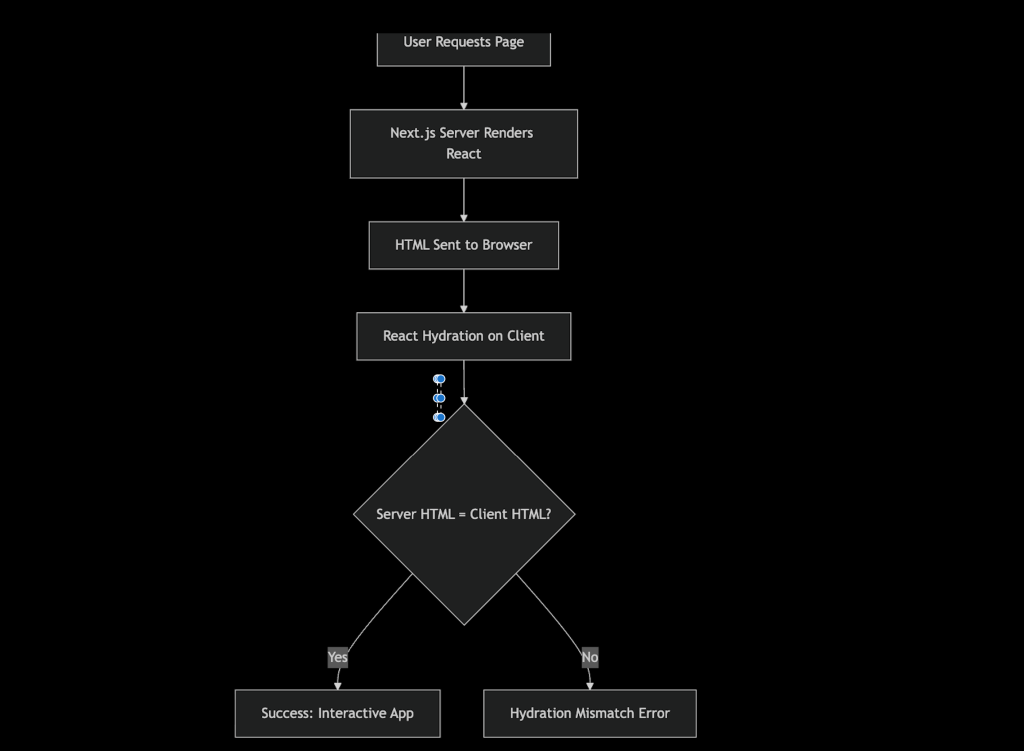
In React (and Next.js), hydration is the process of taking the static HTML (generated by the server, i.e., Server-Side Rendering or Static Site Generation) and then attaching the React app to it on the client side (the browser) and makes it interactive by attaching event listeners and state.

Server Side: Next.js generates HTML on the server and sends it to the browser.

Client Side: React runs in the browser and "hydrates" (attaches event listeners, state, interactivity) onto that HTML.

The Critical Rule: The HTML React generates on the client must EXACTLY match what the server sent. If they don't match, you get a hydration error.

👉 Hydration makes your server-rendered page interactive.
Part 2: Why Reactjs Hydration Errors Occur
The Core Problem
Hydration errors happen when:
Server-rendered HTML ≠ Client-rendered HTMLThis mismatch confuses React because it expects to “attach” to existing HTML, but finds something different instead. That means:
- The server sent one thing (e.g.,
<div>Hello</div>), - But React on the client renders another (e.g.,
<div>Hi</div>).
React then throws a hydration error because it can’t “merge” the two properly.
Real-World Analogy
Imagine you’re assembling furniture using a manual:
- Server = The manual shows how to build a blue chair
- Client = You built a red chair instead
- React = “Wait, this doesn’t match! I need to rebuild it from scratch”
When React detects this mismatch, it throws away the server HTML and re-renders everything on the client, losing all SSR benefits
🐛 A Real Project Case Study
Here we will learn most common reactjs hydration errors.
1. Browser-Only APIs (THE MOST COMMON)
// ❌ This will cause hydration error
function UserProfile() {
  const username = localStorage.getItem('username');
  return <div>Welcome, {username}!</div>;
}
Why it fails:
- Server:
localStoragedoesn’t exist →usernameisnull - Client:
localStorageexists →usernameis"John" - Result: Server renders “Welcome, !” but client wants “Welcome, John!”
To fix the issues, we need to do as follow
// ✅ Correct approach
function UserProfile() {
  const [username, setUsername] = useState(null);

  useEffect(() => {
    // This ONLY runs on the client
    setUsername(localStorage.getItem('username'));
  }, []);

  return <div>Welcome, {username || 'Guest'}!</div>;
}
Why this works:
- Server: Renders “Welcome, Guest!”
- Client first render: Also renders “Welcome, Guest!” (matches!)
- After useEffect: Updates to “Welcome, John!” (no hydration involved)
Imagine we’re building a learning platform with exercises. We store user progress in localStorage via Zustand.
2. Rendering non-deterministic values or Browser-Only APIs (THE MOST COMMON):
Rendering non-deterministic values (things that change between server and client). We need to be careful not to used Date.now(), Math.random(), or new Date() directly in the component render. Here is the problems, this can also be random value between the server and client.
export default function Page() {
  return <p>{Math.random()}</p>; // Different on server vs client
}

or
// ❌ Server and client times will differ
function Clock() {
  return <div>{new Date().toLocaleString()}</div>;
}

or
// ❌ Random IDs differ between renders
function RandomComponent() {
  const id = Math.random().toString(36);
  return <div id={id}>Content</div>;
}
Why it fails:
- Server: Renders “2025-10-01 10:30:00”
- Client: Renders “2025-10-01 10:30:01” (a second later)
- Result: Mismatch!
- Server: Generates
id="abc123" - Client: Generates
id="xyz789" - Result: Different IDs!
To fix the error we need to follow following strategy.
// ✅ Generate ID only on client
function RandomComponent() {
  const [id, setId] = useState('');

  useEffect(() => {
    setId(Math.random().toString(36));
  }, []);

  return <div id={id || 'default'}>Content</div>;
}

// ✅ Better: Use a stable ID generator
import { useId } from 'react'; // React 18+

function RandomComponent() {
  const id = useId(); // Same on server and client!
  return <div id={id}>Content</div>;
}
3.Date and Time
As the date and time calculation are different at client and server.
// ❌ Server and client times will differ
function Clock() {
  return <div>{new Date().toLocaleString()}</div>;
}
Why it fails:
- Server: Renders “2025-10-01 10:30:00”
- Client: Renders “2025-10-01 10:30:01” (a second later)
- Result: Mismatch!
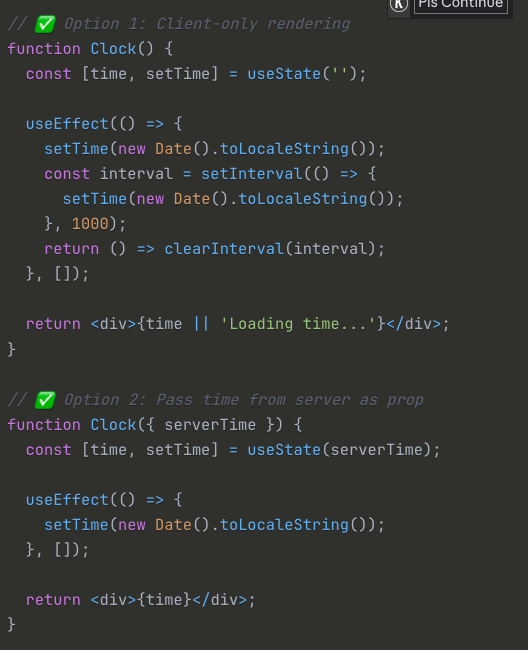
To fix, we can use useEffect as it is only run at client side.
// ✅ Option 1: Client-only rendering
function Clock() {
  const [time, setTime] = useState('');

  useEffect(() => {
    setTime(new Date().toLocaleString());
    const interval = setInterval(() => {
      setTime(new Date().toLocaleString());
    }, 1000);
    return () => clearInterval(interval);
  }, []);

  return <div>{time || 'Loading time...'}</div>;
}

// ✅ Option 2: Pass time from server as prop
function Clock({ serverTime }) {
  const [time, setTime] = useState(serverTime);

  useEffect(() => {
    setTime(new Date().toLocaleString());
  }, []);

  return <div>{time}</div>;
}
4. Window or Document Access
The Problem, as window object exist only at client or browser, accessing it at server cost the reacttjs hydration error.
// ❌ window doesn't exist on server
function ResponsiveComponent() {
  const isMobile = window.innerWidth < 768;
  return isMobile ? <MobileView /> : <DesktopView />;
}
To fix, we can handle it by
// ✅ Detect client-side
function ResponsiveComponent() {
  const [isMobile, setIsMobile] = useState(false);

  useEffect(() => {
    const checkMobile = () => {
      setIsMobile(window.innerWidth < 768);
    };

    checkMobile();
    window.addEventListener('resize', checkMobile);
    return () => window.removeEventListener('resize', checkMobile);
  }, []);

  // Render mobile-first (works on server)
  return isMobile ? <MobileView /> : <DesktopView />;
}
5. Third-Party Libraries
The Problem:
// ❌ Library that manipulates DOM during render
function ChartComponent() {
  useThirdPartyChart('#chart'); // Modifies DOM unpredictably
  return <div id="chart"></div>;
}
To fix the problem, we can do it by
// ✅ Initialize after hydration
function ChartComponent() {
  useEffect(() => {
    useThirdPartyChart('#chart');
  }, []);

  return <div id="chart"></div>;
}
6. Zustand/Redux with Persistence (Advanced)
This is what caused the error in the document you shared!
// ❌ Zustand store with localStorage persistence
const useStore = create(
  persist(
    (set) => ({
      count: 0,
      increment: () => set((state) => ({ count: state.count + 1 })),
    }),
    { name: 'my-store' }
  )
);

function Counter() {
  const count = useStore((state) => state.count);
  return <div>Count: {count}</div>;
}
Why it fails:
- Server: No localStorage →
countis0 - Client: Has localStorage →
countis42 - Result: Mismatch!
The Fix:
// ✅ Wait for hydration before accessing store
function Counter() {
  const [hasHydrated, setHasHydrated] = useState(false);
  const count = useStore((state) => state.count);

  useEffect(() => {
    setHasHydrated(true);
  }, []);

  if (!hasHydrated) {
    return <div>Count: 0</div>; // Matches server render
  }

  return <div>Count: {count}</div>;
}
📚 Part 3 Prevention Strategies for Reactjs hydration
Lets creates a hydration safety checklist for code reviews, for our code if your are using claude or gemini or any other ai cli create file for hydration check in *.md
During Development
- Avoid accessing
window,document,localStorageduring render - Use
useEffectfor all browser-specific code - Be careful with
Date.now(),Math.random(), timestamps - Test components with SSR disabled and enabled
- Use TypeScript to catch
windowusage at compile time
# Hydration Safety Code Review Checklist

## 🔍 Red Flags (Immediate Issues)
- [ ] Direct `localStorage`/`sessionStorage` access in render
- [ ] `window`/`document` usage outside useEffect
- [ ] `Math.random()` or `Date()` in render
- [ ] Conditional rendering based on browser state

## 🛡️ Safe Patterns
- [ ] Browser APIs only in `useEffect` or event handlers
- [ ] Consistent initial state between server and client
- [ ] `ClientOnly` wrapper for browser-dependent UI
- [ ] Proper loading states for client-side data

## 🧪 Testing Requirements
- [ ] Hydration test for new components
- [ ] Both server and client rendering verified
- [ ] Loading states tested
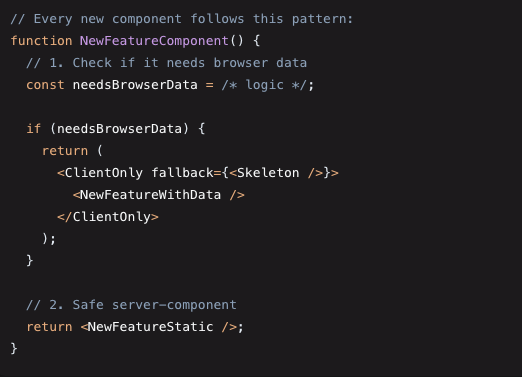
The Team’s New Development Process
// ❌ Bad: Wrapping too much
function MyPage() {
  return (
    <ClientOnly>
      <EntirePage /> {/* Loses all SSR benefits! */}
    </ClientOnly>
  );
}

// ✅ Good: Wrapping only what's needed
function MyPage() {
  return (
    <div>
      <Header /> {/* SSR ✓ */}
      <MainContent /> {/* SSR ✓ */}
      <ClientOnly>
        <UserSpecificWidget /> {/* Client-only */}
      </ClientOnly>
      <Footer /> {/* SSR ✓ */}
    </div>
  );
}
📖 Reactjs Hydration Cheat Sheet
🚫 NEVER DO THIS
- localStorage.getItem() in render
- window.innerWidth in render
- new Date() in render
- Math.random() in render
- Conditional render based on browser state
✅ ALWAYS DO THIS
- Use useEffect for browser APIs, Browser APIs don’t exist during SSR – plan accordingly
- Use ClientOnly for browser-dependent UI, ClientOnly wrappers are powerful for complex case.
- Provide consistent initial state
- Add proper loading states
- Test both server and client rendering, Systematic testing catches issues early
- Loading states are essential for good UX
🛠️ QUICK FIXES
- Wrap with <ClientOnly>
- Move browser code to useEffect
- Use hydration-safe hooks
- Add skeleton loading states
Part 4 Advanced Solutions for Reactjs Hydration
Solution 1: Next.js Dynamic Imports
import dynamic from 'next/dynamic';

// Disable SSR for specific component
const NoSSRComponent = dynamic(
  () => import('./MyComponent'),
  { ssr: false }
);

function MyPage() {
  return (
    <div>
      <NoSSRComponent />
    </div>
  );
}
When to use:
- Third-party libraries that don’t support SSR
- Heavy components that don’t need SEO
- Components that definitely need browser APIs
Solution 2: Custom Hook for Client Detection
import { useEffect, useState } from 'react';

export function useIsClient() {
  const [isClient, setIsClient] = useState(false);

  useEffect(() => {
    setIsClient(true);
  }, []);

  return isClient;
}

// Usage
function MyComponent() {
  const isClient = useIsClient();

  if (!isClient) {
    return <div>Loading...</div>;
  }

  return <div>{localStorage.getItem('data')}</div>;
}
Solution 3: Suppress Hydration Warning (Use Sparingly!)
// Only use when you KNOW the mismatch is intentional
function TimeComponent() {
  return (
    <div suppressHydrationWarning>
      {new Date().toLocaleString()}
    </div>
  );
}
⚠️ Warning: This suppresses the error but doesn’t fix the underlying issue. Use only for unavoidable cases like timestamps.
suppressHydrationWarning is about using the suppressHydrationWarning prop in React. In short: This prop tells React: “I know the server and client HTML will be different here, stop warning me about it.
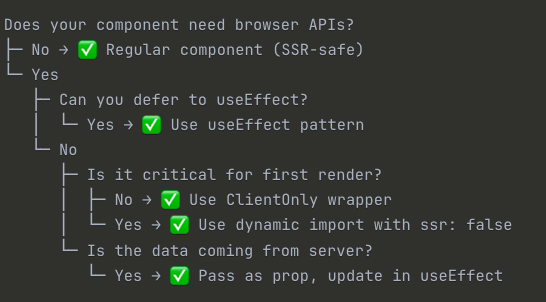
Decision Tree
Conclusion
Key Takeaways
- Hydration = React attaching interactivity to server HTML
- Errors occur when server HTML ≠ client HTML
- Main culprit = Browser APIs accessed during render
- Best fix = Use
useEffectorClientOnlywrapper - Prevention = Think “Will this be different on server vs. client?”
Remember
- Server doesn’t have
window,localStorage,document - Time, random values, and user data differ between renders
useEffectruns only on client, never on server- Wrap minimum necessary code in
ClientOnly - Test with SSR enabled during development