1. Build a Lean Go (Golang) Docker Image Using Multi-Stage Builds
Key idea: Use multi-stage builds in your Dockerfile to compile your Go app in one stage and only copy the final binary into a minimal final image—this dramatically reduces image size and removes build tools from production images.
Core steps:
- First stage: Use a Go base image (e.g., golang:1.20-alpine) and compile your application—downloading dependencies and building the binary. MediumDocker Documentation
- Final stage: Start from a minimal base (like alpine or even scratch), and copy just the compiled binary from the build stage. Optionally install runtime utilities such as ca-certificates if needed.
Why it matters:
- Smaller, faster-loading images
- Streamlined and secured production deployments
- Better build caching and iteration speed
2. Connect Containers via Docker Networks
Key idea: Containers on the same Docker user-defined network can talk to each other by container name, simplifying communication without worrying about IPs.
Core steps:
- Create a user-defined bridge network:
docker network create my-network - Run containers and attach them to the same network:
docker run --name server --network my-network ...docker run --name client --network my-network ...
This setup allows using container names for communication.
Why it matters:
- Simplifies service discovery (no IPs, just names)
- Offers clearer network management tailored to your setup
3. Orchestrate Containers with Docker Compose & Control Startup Order
Key idea: Use Docker Compose to define multiple services, ensure correct startup dependency, and manage readiness via health checks.
Core steps:
- In your
docker-compose.yml, usedepends_on:
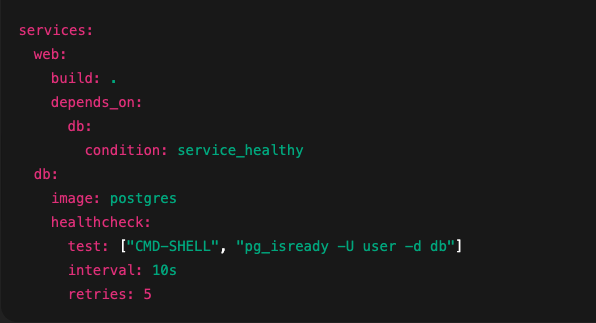
- The Compose service
webwill wait untildbpasses its healthcheck. Withoutcondition: service_healthy, Compose only ensures containers are running—not ready.
Why it matters:
- Prevent startup errors in dependent applications
- More resilient, production-ready service orchestration.
Final Summary & Flow
- Build your Go app using multi-stage Docker builds for a small, clean image.
- Create a Docker network, allowing containers to discover and communicate by name.
- Use Docker Compose to coordinate services, specifying correct startup order and service readiness.
______________________________________________________
** Explain like I’m five (in simple terms):**
1. Multi-stage Docker builds for Go (Golang)
Imagine you’re baking a cake and only want the frosted final result, not all the bowls and mixers. Multi-stage builds let you keep only the final “cake” (your Go app) in the image, making it smaller and cleaner
** What it does:**
A Dockerfile uses multiple FROM lines representing separate stages. You build your Go binary in one stage, then copy just the finished executable into a minimal base image—so the final image doesn’t include the full Go toolchain Docker DocumentationMedium.
** Why it matters:**
- Smaller image size → faster downloads and less storage.
- More secure → no unnecessary build tools in production image.
- Faster rebuilds using cached layers Medium.
2. Networking: Connecting two standalone containers
** Simple version:**
If two friends are in the same party room (network), they can talk using names, not numbers. Containers in the same Docker network can reach each other by name.
** How it works:**
- Docker default
bridgenetwork works, but user-defined bridge networks are better for clarity and control Docker DocumentationSpacelift. - Containers on the same user-defined network communicate by container name automatically—no need for IPs or manual linking Docker Community ForumsStack Overflow.
- If you’re using Docker Compose, define services together: Compose brings them into the same network by default, allowing them to talk by service names Stack Overflow.
3. Docker Compose: controlling service startup order
** Think of it as:**
You want your breakfast meal: first the toast pops up, then the eggs. Compose lets you define which service starts first, ensuring the dependent one waits correctly.
** Technical skill:**
Use depends_on in your docker-compose.yml to specify dependencies. Compose starts services based on this order Docker Documentation+1.
** Caveat:**depends_on only ensures containers start—not that they’re ready to accept connections. To handle readiness, you can add health checks and use conditions like service_healthy