So far from our previous tutorial till now, our simple bank system supports creating, updating, retrieving, and transferring money between accounts.
But it lacks one critical feature: user authentication & authorization without user there is no use of banking apps.
To prepare for that, today we’ll adding a new users table to the database and connect or establish relationship it with the accounts table using foreign key and unique constraints.
Table of Contents
Current System Analysis
Our current banking system has these features implemented:
- Create, update, and retrieve bank accounts via account table.
- Transfer money between accounts
- Each account has an
ownerfield (currently just a string). - We want this
ownerfield to actually reference a real user. - So, we’ll create a
userstable and linkaccounts.owner → users.username.
sql-- Current accounts table
CREATE TABLE accounts (
    id BIGSERIAL PRIMARY KEY,
    owner VARCHAR NOT NULL,
    balance BIGINT NOT NULL,
    currency VARCHAR NOT NULL,
    created_at TIMESTAMPTZ NOT NULL DEFAULT (now())
);
Missing Critical Feature: User authentication and authorization
Step 1. Define the New Schema
We will introduce a users table and link it to the accounts table via https://dbdiagram.io/ website where we already had existing postgress table schema for our simple bank and add new user table at the top of existing tables. Lets define user table
Table users as U {
  username varchar [pk]
  hashed_password varchar [not null]
  full_name varchar [not null]
   email varchar [unique, not null]
  password_change_at timestamptz [not null, default: '0001-01-01 00:00:00+00']
  created_at timestamptz [not null, default: 'now()']
}

//Existing code
Table accounts as A {
  id bigserial [pk]
  owner varchar [ref: > U.username, not null]
  balance bigint [not null]
  currency varchar [not null]
  created_at timestamptz [not null, default: 'now()']

  Indexes {
    owner
    (owner, currency) [unique]
  }
}

Table entries {
  id bigserial [pk]
  account_id bigint [ref: > A.id, not null]
  amount bigint [not null, note: 'can be negative or positive']
  created_at timestamptz [not null, default: 'now()']

  Indexes {
    account_id
  }
}

Table transfers {
  id bigserial [pk]
  from_account_id bigint [ref: > A.id, not null]
  to_account_id bigint [ref: > A.id, not null]
  amount bigint [not null, note: 'must be positive']
  created_at timestamptz [not null, default: 'now()']

  Indexes {
    from_account_id
    to_account_id
    (from_account_id, to_account_id)
  }
}
We had used hashed_password instead of password this is because we should never store a naked password in database. We need to add Z at the end of of password_change_at here which means that zero timezone. In postgres this both are same 00:00:00+00 and 00:00:00Z and it is reccommend to used 00:00:00+00.
password_change_at timestamptz [not null, default: '0001-01-01 00:00:00Z']We need to link the owner field of the account table to username field in the users table, thus will make the owner field become a foreign key.
Relationship
- One user can have multiple accounts with different currency.
- Each account must belong to exactly one user (
accounts.owner → users.username). - Composite unique constraint: each
(owner, currency)pair must be unique.- i.e. a user can have multiple accounts in different currencies, but not two USD accounts.
accounts Table Modifications:
- Foreign Key: The
ownercolumn will become a foreign key that referencesusers(username). This establishes a one-to-many relationship (one user can have many accounts). - Unique Constraint: To ensure a user has only one account per currency, a composite unique constraint will be added to the
(owner, currency)pair in index. Thats why it is called composite index, which is an index that involves more than one fields.
We need to export it as PostgresSQL via the dbdigram.io and the download simplebank/sql open it and we have to add this new changes to our simplebank project. We can either replace the whole content of our intial db/migraiton/000001_init_schema.up.sql migration file with new one and reset the whole database and rerun the migrate up command.
However, in a real world project, it’s not the right way go, because the requirements change all the time and its might come after the first version of our system is deployed to the production. Once we have data in production db, we can’t reset it to rerun the old migration.
So the right way to apply new schema change is to create a new migration version.
Step 2. Create a New Database Migration version
Instead of modifying the initial schema file (which is bad practice for live databases), we’ll create a new migration file.
Run the following command in the terminal to generate new migration files:
migrate create -ext sql -dir db/migration -seq add_usersThis will create ..._add_users.up.sql and ..._add_users.down.sql files in the db/migration directory. Where -seq is a sequential number as the file name prefix and the migration name is add_users.
By running above command in terminal in project root folder, it generate 2 migraiton files has been generated inside the db/migration/000002_add_users.up.sql folder. We need to add our new changes like for a new user table plus relationship with account that is foreign key constraint and query to create a unique composite index for the owner and currency as well. Open the ..._add_users.up.sql file and add the following SQL commands.
CREATE TABLE "users" (
  "username" varchar PRIMARY KEY,
  "hashed_password" varchar NOT NULL,
  "full_name" varchar NOT NULL,
  "email" varchar UNIQUE NOT NULL,
  "password_change_at" timestamptz NOT NULL DEFAULT '0001-01-01 00:00:00+00',
  "created_at" timestamptz NOT NULL DEFAULT 'now()'
);

ALTER TABLE "accounts" ADD FOREIGN KEY ("owner") REFERENCES "users" ("username");
CREATE UNIQUE INDEX ON "accounts" ("owner", "currency");
Each owner has at most 1 account for a specific currency, here instead of using a direct unique index like this CREATE UNIQUE INDEX ON “accounts” (“owner”, “currency”); we can add a unique constraint for the pair of owner and currency on the accounts table.
--CREATE UNIQUE INDEX ON "accounts" ("owner", "currency");
-- Add a composite unique constraint to ensure one user has at most one account per currency
ALTER TABLE "accounts" ADD CONSTRAINT "owner_currency_key" UNIQUE ("owner", "currency");
Adding this unique constraint will automatically create the same unique composite index for owner and currency as the command Create unique index on. The Postgres will need that index to check and enforce the unique constraint faster.
Note: An alternative to the ADD CONSTRAINT for uniqueness is CREATE UNIQUE INDEX on "accounts" ("owner", "currency"). Both achieve a similar result, but using a named constraint is often clearer.
Step 3. Run the Migration and Handle Errors
Run the migrateup command from the Makefile, to apply this new migration:
make migrateupWe got an error, because of the foreign key constraint is violated. Potential Error: We have existing data in the accounts table, this migration will fail because the owner values don’t correspond to any users until now. The error will be a foreign key violation.
How to Fix a Failed Migration:
- The failed migration will leave or change the database in a
dirtystate and version set to 2 in theschema_migrationstable. In tablePlusschema_migrationstable we must manually connect to your database and change thedirtycolumn value fromtruetofalsefor the failed version. - Since this is a development environment, we can safely clear the database. Run the
migratedowncommand to drop or clean all table for purpose of cleaning up the data, we get an error because dirty version is True if we didnt change to false.Now we can run make migratedownsuccessfully once dirty state is set to false and all tables in our database are gone. - Now, run the
migrateupcommand again. It should succeed on the clean database.make migrateup - Now back to tableplus we see new user table and check all the fields that we define and we can see to BTree index in table pluss in users table, firs one is for primary key username which should be unique and other is email which is unique index as well.
- In accounts table we see at bottom in tableplus there is new unique index for the owner and currency pair.
Step 4. Implement the “Down” Migration
The “down” migration should reverse the changes made in the “up” migration. Open the 000002_add_users.down.sql file and add the following:
-- The order of operations is the reverse of the 'up' migration.
ALTER TABLE IF EXISTS "accounts" DROP CONSTRAINT IF EXISTS "owner_currency_key";
ALTER TABLE IF EXISTS "accounts" DROP CONSTRAINT IF EXISTS "accounts_owner_fkey";
DROP TABLE IF EXISTS "users";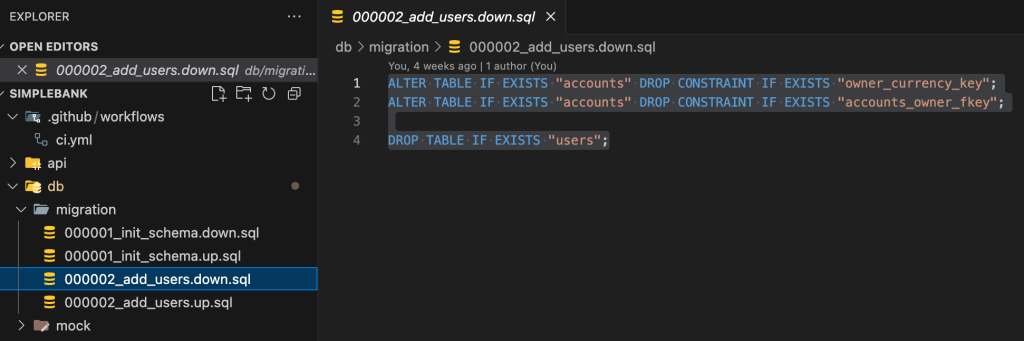
Note: The foreign key constraint name (accounts_owner_fkey) is auto-generated by PostgreSQL. You can find the exact name by inspecting the table structure in a database tool like TablePlus or psql.
Step 5. Enhance Makefile for Step-by-Step Migrations
To make testing single migrations easier, add commands to the Makefile to apply or roll back one version at a time. At the moment we have only one make migration up and down command to run all the migration up/down version. Add one new migration for adding our new user table and its related queries which we had implemented.
# Existing commands

migrateup:
	migrate -path db/migration -database "postgresql://postgres:mysecretpassword@localhost:5432/simple_bank?sslmode=disable" -verbose up

migratedown:
	migrate -path db/migration -database "postgresql://postgres:mysecretpassword@localhost:5432/simple_bank?sslmode=disable" -verbose down

# Add these new commands
migrateup1:
	migrate -path db/migration -database "postgresql://postgres:mysecretpassword@localhost:5432/simple_bank?sslmode=disable" -verbose up 1

migratedown1:
	migrate -path db/migration -database "postgresql://postgres:mysecretpassword@localhost:5432/simple_bank?sslmode=disable" -verbose down 1

.PHONY: migrateup migratedown migrateup1 migratedown1
The migrate command is the same as before, except we add the number 1 at the end, which means we only want to rollback the last migration that was applied.
Command Usage
make migrateup1: Apply only the next migrationmake migratedown1: Rollback only the last migrationmake migrateup: Apply all pending migrationsmake migratedown: Rollback all migrations
Step 6. Test the Migrations
- Test the down migration: Roll back the last migration.
make migratedown1Verify that theuserstable is gone and the constraints on theaccountstable have been removed. - Test the up migration: Re-apply the migration.
sh make migrateup1
Verify that theuserstable and all constraints are correctly recreated.
You have now successfully added the users table and updated your database schema using a versioned migration.
✅ Summary
In this lesson we:
- Created a users table with secure password & unique constraints.
- Linked
accounts.owner→users.usernamevia foreign key. - Added a composite unique constraint
(owner, currency)for data consistency. - Implemented migration up & down scripts.
- Verified schema changes in PostgreSQL.
This sets the foundation for the next step: user authentication & authorization.