This tutorial demonstrates how to securely store user passwords using bcrypt hashing in a Golang banking application. We’ll implement password hashing, verification, and create a complete user registration API with proper validation and security practices.
Table of Contents
Understanding bcrypt
How bcrypt Works
bcrypt is a password hashing function based on the Blowfish cipher, designed to be slow and resistant to brute-force attacks.
Key Features:
- Adaptive cost: Configurable number of rounds
- Built-in salt: Random salt generated for each hash
- Rainbow table protection: Salt prevents precomputed attacks
- Future-proof: Cost can increase as hardware improves
bcrypt Hash Structure
A bcrypt hash string contains four components and all of these part are concatenate into single hash string and this is string that we store in database :
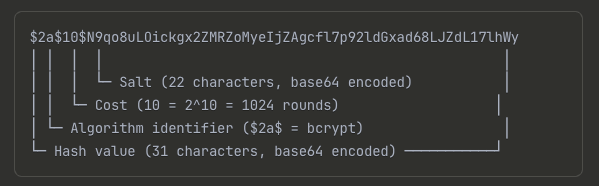
Components Breakdown:
- Algorithm ID (
$2a$): bcrypt identifier - Cost (
10): 2^10 = 1024 iterations, in our case we used cost 10. - Salt (22 chars): Random 128-bit salt, base64 encoded
- Hash (31 chars): 192-bit hash value, base64 encoded
Why Hash Passwords?
- Never store plain text passwords. If your database is compromised, plain text passwords expose users to significant risk.
- Hashing converts a password into a fixed-length, irreversible string.
- Bcrypt is a robust hashing function designed for passwords:
- Incorporates a random salt to prevent rainbow table attacks.
- Includes a cost factor to make hashing computationally expensive, thwarting brute-force attacks.
But when users login, how can we verify that the password that they entered is correct or not?
- This can be done by following steps
- 1. We have to find the hashed password stored in the DB by username.
- 2. Then use the cost and salt of that hashed password as the arguments to hash the password users just entered with bcrypt.
The output of this will be another hash value. All we need to do is to compare the 2 hash values. If they are the same then the password is correct.
Implement Password Hashing
In previous tutorial we have learn how to add a new user in the database. The hashed password is the one of the input parameters of this CreateUser function. The createRandomUser in db/sqlc/user_test.go for the HashedPassword we used simple “secret” string for the hash password filed and this doesn’t reflect the real correct values of this field should hold.
In this tutorial we are going to update it to use a real hash string.
func createRandomUser(t *testing.T) User {
	hashedPassword, err := util.HashPassword(util.RandomString(6))
	require.NoError(t, err)

	args := CreateUserParams{
		Username:       util.RandomOwner(),
		HashedPassword: "secret",
		FullName:       util.RandomOwner(),
		Email:          util.RandomEmail(),
	}
Step 1: Implement Password Utilities
Create util/password.go: we have two function
- func HashPassword(password string) HashPassword hashes a plain text password using bcrypt with default cost. In this function we used bcrypt.GenerateFromPassword this function need two input parameter the password of type byte silce and a cost.
- func CheckPassword:CheckPassword compares a plain text password with a hashed password.
package util

import ("fmt" "golang.org/x/crypto/bcrypt")

// generate hashed password using bycrypt
func HashPassword(password string) (string, error) {
	hashedPassword, err := bcrypt.GenerateFromPassword([]byte(password), bcrypt.DefaultCost) // bcrypt.DefaultCost is 10
	if err != nil {
		return "", fmt.Errorf("failed to hash password: %w", err)
	}
	return string(hashedPassword), nil
}

// Check provided Password matches hashedPassword or not
func CheckPassword(password, hashedPassword string) error {
	return bcrypt.CompareHashAndPassword([]byte(hashedPassword), []byte(password))
}
HashPassword(password string):- Takes a plain-text password.
- Uses
bcrypt.GenerateFromPasswordwithbcrypt.DefaultCostto generate a hash. - Returns the hashed password as a string.
CheckPassword(password, hashedPassword string):- Takes a plain-text password and a hashed password.
- Uses
bcrypt.CompareHashAndPasswordto verify if the password matches the hash. - Returns an error if they don’t match.
Step 2. Write Password Hashing Tests
Create util/password_test.go here we write some unit tests to make sure that above two functions work as expected.
package util

import ("testing" "github.com/stretchr/testify/require"
	"golang.org/x/crypto/bcrypt")

// tests the HashPassword and CheckPassword function
func TestPassword(t *testing.T) {
	password := RandomString(6)

	hashedPassword1, err := HashPassword(password)
	require.NoError(t, err)
	require.NotEmpty(t, hashedPassword1)

	err = CheckPassword(password, hashedPassword1)
	require.NoError(t, err)

	//Test for wrong password case
	wrongPassword := RandomString(6)
	err = CheckPassword(wrongPassword, hashedPassword1)
	require.EqualError(t, err, bcrypt.ErrMismatchedHashAndPassword.Error())
	require.EqualError(t, err, bcrypt.ErrMismatchedHashAndPassword.Error())

	//Test for empty password
	err = CheckPassword("", hashedPassword1)
	require.EqualError(t, err, bcrypt.ErrMismatchedHashAndPassword.Error())

	//to test two hashes password from same password
	hashedPassword2, err := HashPassword(password)
	require.NoError(t, err)
	require.NotEmpty(t, hashedPassword2)
	require.NotEqual(t, hashedPassword1, hashedPassword2)

}TestPassword:
- Generates a random password.
- Hashes the password and asserts that no error occurs and the hash is not empty.
- Checks the correct password and asserts no error is returned.
- Checks an incorrect password and asserts that
bcrypt.ErrMismatchedHashAndPasswordis returned. - Verifies that hashing the same password twice produces two different hashes due to the random salt. This is done by on the code with green background where we add duplicate hashed_password to verify it.
Run the test by clicking on run test on this function or we can run the following command in terminal.
go test -v ./utilTest Coverage:
- Hash Generation: Verify hash is created successfully
- Correct Password: Verify valid password passes check
- Wrong Password: Verify invalid password fails check
- Salt Randomness: Verify same password produces different hashes
3. Update User Creation Logic
Update db/sqlc/user_test.go to use real password hashing:
In db/sqlc/user_test.go, modify createRandomUser to use the new util.HashPassword function to generate a real hashed password for tests.
func createRandomUser(t *testing.T) User {
    hashedPassword, err := util.HashPassword(util.RandomString(6))
    require.NoError(t, err)

    arg := CreateUserParams{
        Username:       util.RandomOwner(),
        HashedPassword: hashedPassword, // Use real bcrypt hash
        FullName:       util.RandomOwner(),
        Email:          util.RandomEmail(),
    }
Now we can verify this by openning our tablePlus application to check the users table we can see that we have hashed password. The hashed_password column is now containing the correct bcrypt hashed string.
4. Create User API Endpoint
Next step,we are going to use the HashPassword function that we’ve written to implement the create user API for our simple bank.
Let’s create a new file api/user.go. inside the api package. This API will be very much alike the create account API that we’ve implemented before, So I’m just gonna copy it from the account.go file.
package api

import (
    "net/http"
    "time"

    "github.com/gin-gonic/gin"
    "github.com/lib/pq"
    db "your-project/db/sqlc"
    "your-project/util"
)

type createUserRequest struct {
    Username string `json:"username" binding:"required,alphanum"`
    Password string `json:"password" binding:"required,min=6"`
    FullName string `json:"full_name" binding:"required"`
    Email    string `json:"email" binding:"required,email"`
}

type createUserResponse struct {
    Username          string    `json:"username"`
    FullName          string    `json:"full_name"`
    Email             string    `json:"email"`
    PasswordChangedAt time.Time `json:"password_changed_at"`
    CreatedAt         time.Time `json:"created_at"`
}

func (server *Server) createUser(ctx *gin.Context) {
    var req createUserRequest

    if err := ctx.ShouldBindJSON(&req); err != nil {
        ctx.JSON(http.StatusBadRequest, errorResponse(err))
        return
    }

// Hash the password
    hashedPassword, err := util.HashPassword(req.Password)
    if err != nil {
        ctx.JSON(http.StatusInternalServerError, errorResponse(err))
        return
    }

    arg := db.CreateUserParams{
        Username:       req.Username,
        HashedPassword: hashedPassword,
        FullName:       req.FullName,
        Email:          req.Email,
    }

    user, err := server.store.CreateUser(ctx, arg)
    if err != nil {
        if pqErr, ok := err.(*pq.Error); ok {
            switch pqErr.Code.Name() {
            case "unique_violation":
                ctx.JSON(http.StatusForbidden, errorResponse(err))
                return
            }
        }
        ctx.JSON(http.StatusInternalServerError, errorResponse(err))
        return
    }

// Build response without sensitive data
    rsp := createUserResponse{
        Username:          user.Username,
        FullName:          user.FullName,
        Email:             user.Email,
        PasswordChangedAt: user.PasswordChangedAt,
        CreatedAt:         user.CreatedAt,
    }

    ctx.JSON(http.StatusOK, rsp)
}
createUserRequest struct:
- Defines the request body for creating a user.
- Includes validation tags:
username:required,alphanumpassword:required,min=6full_name:requiredemail:required,email- The alphanum tag is provided by the validator package. It basically means that this field should contain ASCII alphanumeric characters only.
createUser handler:
Here we use the ctx.ShouldBindJSON function to bind the input parameters from the context into the request object. If any of the parameters are invalid, we just return bad request status to the client.
- Binds and validates the JSON request.
- Hashes the user’s password using
util.HashPassword. - Calls
store.CreateUserwith the validated and prepared data. - Handles potential database errors, specifically
unique_violationfor username or email, returning403 Forbidden. - Otherwise, we will use them build the db.CreateUserParams object.
Register Route:
- In
api/server.go, add a newPOST /usersroute that maps to theserver.createUserhandler.
Security Considerations:
- Hash password before storing
- Exclude hashed password from response
- Handle unique constraint violations appropriately
Error Handling:
- 400 Bad Request: Invalid input parameters
- 403 Forbidden: Username/email already exists
- 500 Internal Server Error: Unexpected errors
Step 5: Register API Route
Update api/server.go:
func NewServer(store db.Store) *Server {
    server := &Server{store: store}
    router := gin.Default()

    // Register custom validator
    if v, ok := binding.Validator.Engine().(*validator.Validate); ok {
        v.RegisterValidation("currency", validCurrency)
    }

    // User routes
    router.POST("/users", server.createUser)

    // Account routes
    router.POST("/accounts", server.createAccount)
    router.GET("/accounts/:id", server.getAccount)
    router.POST("/transfers", server.createTransfer)

    server.router = router
    return server
}
Now run the make server to restart the server again and use postman to test the new method POST to create a user.
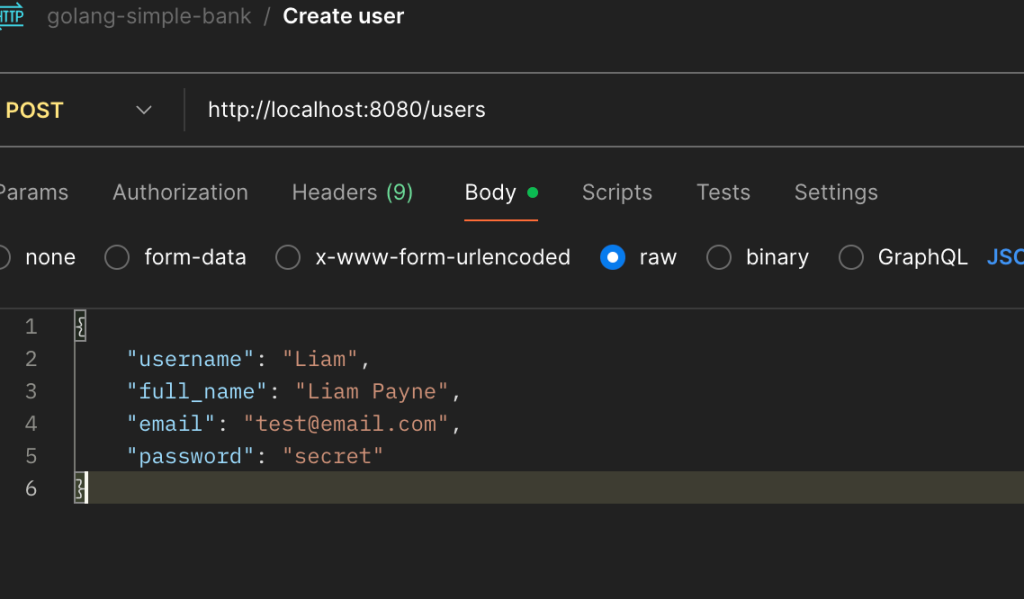
Expected success response
HTTP/1.1 200 OK
{
    "username": "john_doe",
    "hashed_password": "dfsfsdfsdfsd ...."
    "full_name": "John Doe",
    "email": "[email protected]",
    "password_changed_at": "0001-01-01T00:00:00Z",
    "created_at": "2023-01-01T12:00:00Z"
}
6. Test the Create User API
Use Postman to test the POST /users endpoint: Now test the validation error, if you sent the same post request with same data it show, 403 Forbidden status code.
- Happy Path: Create a new user with valid data.
- Expected:
201 Createdwith user data (excluding hashed password).
- Expected:
- Duplicate Username: Try to create a user with an existing username.
- Expected:
403 Forbidden.
- Expected:
- Duplicate Email: Try to create a user with an existing email.
- Expected:
403 Forbidden.
- Expected:
- Invalid Data: Test with invalid username, email, and short password.
- Expected:
400 Bad Requestwith corresponding validation errors.
- Expected:
7. Secure API Response
Problem: The createUser API response includes the hashed password, which is a security risk. As in our case at current user can see the hashed_password in the api response and we need to remove this field in response body.
Solution:
- Create a new
createUserResponsestruct inapi/user.go. - This struct mirrors the
db.Userstruct but omits theHashedPasswordfield. - Modify the
createUserhandler to build and return this new response object instead of the rawdb.Userobject by creating new createUserResponse object at the end of the CreateUser function.
#in api/user.go
...

type userResponse struct {
	Username          string    `json:"username"`
	FullName          string    `json:"full_name"`
	Email             string    `json:"email"`
	PasswordChangedAt time.Time `json:"password_changed_at"`
	CreatedAt         time.Time `json:"created_at"`
}

func newUserResponse(user db.User) userResponse {

	return userResponse{
		Username:          user.Username,
		FullName:          user.FullName,
		Email:             user.Email,
		PasswordChangedAt: user.PasswordChangeAt,
		CreatedAt:         user.CreatedAt,
	}
}
func (server *Server) createUser(ctx *gin.Context) {
	var req createUserRequest
	if err := ctx.ShouldBindJSON(&req); err != nil {
		log.Println(err)
		ctx.JSON(http.StatusBadRequest, errorResponse(err))
		return
	}

	// generate hashed password
	hashedPassword, err := util.HashPassword(req.Password)
	if err != nil {
		ctx.JSON(http.StatusInternalServerError, errorResponse(err))
		return
	}
	arg := db.CreateUserParams{
		Username:       req.Username,
		HashedPassword: hashedPassword,
		FullName:       req.FullName,
		Email:          req.Email,
	}

	// arg = db.CreateUserParams{} this pass the user create test because of CreateUser(gomock.Any(), gomock.Any()).
	// the second argument make it week or failing matcher

	user, err := server.store.CreateUser(ctx, arg)
	if err != nil {
		if pqErr, ok := err.(*pq.Error); ok {
			switch pqErr.Code.Name() {
			case "unique_violation":
				ctx.JSON(http.StatusForbidden, errorResponse(err))
				return
			}
		}
		ctx.JSON(http.StatusInternalServerError, errorResponse(err))
		return
	}

	// return user without password
	rsp := newUserResponse(user)

	ctx.JSON(http.StatusOK, rsp)

}
Conclusion
We have successfully implemented secure password storage by:
- Using bcrypt hashing with appropriate cost factor and automatic salt generation
- Creating secure password utilities for hashing and verification
- Implementing user registration API with proper validation and error handling
- Excluding sensitive data from API responses
- Handling database constraints appropriately
- Following security best practices for password management
This foundation provides a secure user authentication system that protects user credentials even in case of database compromise. The next step would be implementing user login functionality with JWT tokens for session management.