This tutorial will guide you through implementing a transfer money API, including creating a custom validator for currency fields. This tutorial will guide you through implementing a transfer money API, including creating a custom validator for currency fields.
Table of Contents
Step 1. Create the Transfer API and account validator function
First, we’ll create the API endpoint for handling money transfers in api folder as below.
api/transfer.go
Create a new file api/transfer.go. This file will contain the logic for the transfer API. Implmentation of transfere money is very similar to that of the create account API.
- We need to define struct to store input parameters of this API we called it transferRequest
- The amount field in typescript should be greater than 0
- We name our API transfere handler function name as transferRequest
- Create account validation function validAccount, we need to check if account exist in db or not, if not then return StatusBadRequest to user via calling ctx.JSON(). then compare to and from account currency, make sure that they both are same this is done by function.
package api

import (
    "database/sql"
    "fmt"
    "net/http"

    "github.com/gin-gonic/gin"
    db "github.com/ngodup/simplebank/db/sqlc"
)

type transferRequest struct {
    FromAccountID int64  `json:"from_account_id" binding:"required,min=1"`
    ToAccountID   int64  `json:"to_account_id" binding:"required,min=1"`
    Amount        int64  `json:"amount" binding:"required,gt=0"`
    Currency      string `json:"currency" binding:"required, oneof=USD EUR CAD"`
}

func (server *Server) createTransfer(ctx *gin.Context) {
    var req transferRequest
    if err := ctx.ShouldBindJSON(&req); err != nil {
        ctx.JSON(http.StatusBadRequest, errorResponse(err))
        return
    }

    // Validate from account
    if !server.validAccount(ctx, req.FromAccountID, req.Currency{
        return
    }

    // Validate to account
    if !server.validAccount(ctx, req.ToAccountID, req.Currency) {
        return
    }

    // Create transfer transaction parameters
    arg := db.TransferTxParams{
        FromAccountID: req.FromAccountID,
        ToAccountID:   req.ToAccountID,
        Amount:        req.Amount,
    }

     //function to perform money transfer, return transferTxResult
// execute transfer transaction
    result, err := server.store.TransferTx(ctx, arg)
    if err != nil {
        ctx.JSON(http.StatusInternalServerError, errorResponse(err))
        return
    }

    ctx.JSON(http.StatusOK, result)
}

func (server *Server) validAccount(ctx *gin.Context, accountID int64, currency string) bool {
   //Step 1 to query account from db
    account, err := server.store.GetAccount(ctx, accountID)
    if err != nil {
        if err == sql.ErrNoRows {
            ctx.JSON(http.StatusNotFound, errorResponse(err))
            return false
        }
        ctx.JSON(http.StatusInternalServerError, errorResponse(err))
        return false
    }

    // Step 2 compare to and from account currency
    if account.Currency != currency {
        err := fmt.Errorf("account [%d] currency mismatch: %s vs %s", account.ID, account.Currency, currency)
        ctx.JSON(http.StatusBadRequest, errorResponse(err))
        return false
    }

    return true
}
Step 2. Register new API Route for Transfere an account
Now, let’s register the new /transfers route in server.go as like others.
api/server.go
In api/server.go, add the following line to register the route:
package api

import (
	"fmt"

	"github.com/gin-gonic/gin"
	"github.com/gin-gonic/gin/binding"
        db "github.com/ngodup/simplebank/db/sqlc"
)

type Server struct {
	config     util.Config
	store      db.Store
	tokenMaker token.Maker
	router     *gin.Engine
}

func NewServer(store db.Store) *Server, error {
server := &Sever{store: store}
router := gin.Default()

authRoutes.POST("/transfers", server.createTransfer)

}

func (server *Server) Start(address string) error { ... }

func errorResponse(err error) gin.H {.... }
Once the route is define we can test it by running server and use postman to test the new transfer API.
make server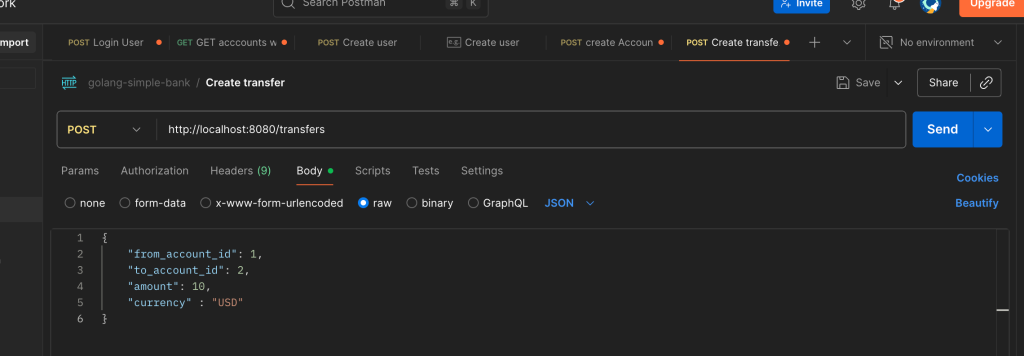
And also open our tableplus software to validate the account to and from before and after the transfer the money. We need the same currency type.
Step 3. Create a Custom Currency Validator
In our step 1 we have define transferRequest struct where currency types are hard coded 3 constant for USD, EUR, and CAD.
type transferRequest struct {
    FromAccountID int64  `json:"from_account_id" binding:"required,min=1"`
    ToAccountID   int64  `json:"to_account_id" binding:"required,min=1"`
    Amount        int64  `json:"amount" binding:"required,gt=0"`
    Currency      string `json:"currency" binding:"required, oneof=USD EUR CAD"`
}
If we have lots of other currency types then it would be very hard to read, easy to make mistake and also chance of making duplicate currency types. There for we define currecny custom validator function in api folder.
api/validator.go
Create a new file api/validator.go:
package api

import (
	"github.com/go-playground/validator/v10"
	"github.com/ngodup/simplebank/util"
)

var validCurrency validator.Func = func(fieldLevel validator.FieldLevel) bool {
	if currency, ok := fieldLevel.Field().Interface().(string); ok {
		//Check if currency is supported
		return util.IsSupportedCurrency(currency)
	}

	return false
}
We need to import validator version 1O as we can see in import of validator package. The validator.Func signature its a function that takes a FieldLevel interface as input and return true when validation succeeds. Based on it we implement it by calling step 4 function IsSupportedCurrency function to check if currency is support or not by returning true or false.
Note: We need to register this custom validator for currency in Gin, that we are doing at step 5 in api/server.go
Step 4: Create Currency Utility Functions
util/currency.go
Create a new file util/currency.go to manage supported currencies inside the util folder or package. We will implement the logic to check if a currency is supported or not in this file. We need to define the some constant for the currencies that we want to support in our banking application.
package util

//Constants for all supported currencies
const (
    USD = "USD"
    EUR = "EUR"
    CAD = "CAD"
)

func IsSupportedCurrency(currency string) bool {
    switch currency {
    case USD, EUR, CAD:
        return true
    }
    return false
}
Step 5. Register the Custom Validator
Register the custom validator in api/server.go. after the gin.Default
package api
import (
	"fmt"

	"github.com/gin-gonic/gin"
	"github.com/gin-gonic/gin/binding"
db "github.com/ngodup/simplebank/db/sqlc"
	"github.com/go-playground/validator/v10"
	"github.com/ngodup/simplebank/util"
)
// NewServer creates a new HTTP server and setup routing

func NewServer(store db.Store) *Server, error {
server := &Sever{store: store}
router := gin.Default()

	if v, ok := binding.Validator.Engine().(*validator.Validate); ok {
		v.RegisterValidation("currency", validCurrency)
	}
// second argulment is validCurrency function in api/validator.go
//Other routes
authRoutes.POST("/transfers", server.createTransfer)

}
Step 6. Start Use the Custom currency Validator
Now once we register this new currency validator registered in gin, we can start using it. Here in api/account.go createAccountRequest struct and transferRequest in api/transfer api we can use the new currency validator instead of constant currency value withe oneof to
before
type transferRequest struct and type createAccountRequest struct {
....
    Currency      string `json:"currency" binding:"required, oneof=USD EUR CAD"`
After change oneof currecny type to yellow background code that is currency validator function
api/transfer.go
type transferRequest struct {
    FromAccountID int64  `json:"from_account_id" binding:"required,min=1"`
    ToAccountID   int64  `json:"to_account_id" binding:"required,min=1"`
    Amount        int64  `json:"amount" binding:"required,gt=0"`
    Currency      string `json:"currency" binding:"required,currency"`
}
api/account.go
type createAccountRequest struct {
    Owner    string `json:"owner" binding:"required"`
    Currency string `json:"currency" binding:"required,currency"`
}
Now the transfer API is ready and uses a custom validator for the currency field. We can restart the sever and check in our POSTMAN for valid and invalid currecny like adding INR, JPN and correct currency wheather currency validator function is working or not.
Key Benefits of This Implementation
1. Custom Validation
- Centralized currency validation logic
- Easy to maintain and extend
- Reusable across multiple APIs
2. Account Verification
- Ensures accounts exist before transfer
- Validates currency consistency
- Prevents invalid operations
3. Transaction Safety
- Uses database transactions for consistency
- Atomic money transfer operations
- Proper error handling
4. Maintainable Code
- Separated validation concerns
- Clear error messages
- Extensible currency support
Best Practices Implemented
- Input Validation: Comprehensive parameter validation using struct tags
- Error Handling: Proper HTTP status codes and error responses
- Business Logic: Currency matching validation before transfer
- Code Organization: Separated concerns into different files
- Extensibility: Easy to add new supported currencies
Conclusion
This implementation provides a robust foundation for a money transfer API with proper validation, error handling, and extensibility. The custom validator pattern allows for clean, maintainable code while ensuring data integrity and business rule compliance