1. Introduction & Context
In this tutorial, we’ll learn how to implement RESTful HTTP APIs in Go using the Gin web framework. This will allow frontend clients to interact with our banking service backend through standardized HTTP endpoints.
The goal of this lesson is to transition from database operations to exposing that functionality via a web API. A RESTful API allows front-end clients (web apps, mobile apps, other services) to interact with your backend using standard HTTP methods (GET, POST, PUT, DELETE) and JSON data.
Table of Contents
1. Introduction to RESTful APIs and Gin
What is a RESTful API?
REST (Representational State Transfer) is an architectural style for distributed hypermedia systems. A RESTful API uses standard HTTP methods (GET, POST, PUT, DELETE) to perform operations on resources (e.g., accounts, users). Key principles include:
- Statelessness: Each request from client to server must contain all the information needed to understand the request.
- Client-Server Architecture: Separation of concerns between client and server.
- Cacheability: Responses can be cached to improve performance.
- Layered System: Intermediaries (proxies, load balancers) can be placed between clients and resources.
Why Gin?
Gin is a high-performance HTTP web framework written in Go. It’s popular due to its speed, robust routing, middleware support, and built-in features like parameter binding and validation. While Go’s net/http package is powerful, frameworks like Gin simplify common web development tasks.
In existing project from lesson 1 to till 13, we had already build database, unit testing plus push the code to github. Now let install the gin to our existing project.
go get github.com/gin-gonic/ginThis command downloads the Gin package and its dependencies, updating your `go.mod` and `go.sum` files.
Project Structure:
Create a new directory api at the root of your project and create server.go and account.go. This will house your API-related code.
simpleBank/
├── api/
│ └── server.go
│ └── account.go
└── main.go
└── …
2. Building the HTTP Server (api/server.go)
In side the code we have db.Store this will allow us to interact with the database when processing API request from clients. The router *gin.Engine will help us send each API reques to the correct handler for processing. Where the file account.go in the API folder is file that handle the all the account related handler for differrent routes for the account for example createAccount is handler for creating new account for POST request for route /accounts.
package api

import (
    "github.com/gin-gonic/gin"
    db "github.com/your-username/simple-bank/db/sqlc"
)

// Server serves HTTP requests for our banking service
type Server struct {
    store  db.Store      // Database operations
    router *gin.Engine   // HTTP router
}

// NewServer creates a new HTTP server and sets up routing
func NewServer(store db.Store) *Server {
    server := &Server{store: store}
    router := gin.Default()
// Creates a Gin router with default middleware (logger n recovery)
//id is uri parameter

    // Add routes
    router.POST("/accounts", server.createAccount)
    router.GET("/accounts/:id", server.getAccount)
    router.GET("/accounts", server.listAccounts)

    server.router = router
    return server
}

// Start runs the HTTP server on a specific address
func (server *Server) Start(address string) error {
    return server.router.Run(address)
}

// errorResponse is a helper to convert an error to a JSON response. This is used consistently across all handlers
func errorResponse(err error) gin.H {
    return gin.H{"error": err.Error()}
}
Contextual Note: gin.Default() provides useful middleware out-of-the-box, such as logging requests and recovering from panics. gin.H is a convenient type alias for map[string]interface{}, commonly used for building JSON responses.
The function Starts the HTTP server on a specified address as input. It main roles is to start the HTTP Server on the input or argument address to listening for API request. In later we might add some gracefully shutdown logic in this function as well.
Gin router (server.router) or server.router.Run(address)The function returns any error that occurs during server startup.
The function errorResponse is a common helper function used in many handlers like api/account.go to handle errors, such as in the createAccount handler to return an error response. This function takes an error as input and returns a gin.H object, which is a shortcut for map[string]interface{}, so we can store whatever key-value data we want in it.
Key Components:
Serverholds: 1.store: to interact with the database. 2.router: Gin engine to handle requestsNewServer: sets up routesStart: starts the server on a given addresserrorResponse: utility function for consistent error handling
3. Building the HTTP Server handler (api/account.go)
Create api/account.go to hold the account-related HTTP handlers. We’ll implement three common API endpoints for accounts: Create, Get, and List.
Handler 1: Create Account (POST /accounts)
This handler accepts JSON data to create a new resource. The Server struct will encapsulate our database store and the Gin router, making it easy to manage API requests. The Input validation with Struct Tags, Gin uses the validator package for automatic input validaiton. The validaiton fields are copied or based on sqlc/acount.sql.go CreateAccountParams and whenever we get input data from clients, it is always a good idea to validate them.is important. To validate the user data the gin use validator called validator10 and we need to install it.
go get github.com/go-playground/validator/v10type CreateAccountRequest struct {
Owner string `json:"owner" binding:"required"`
Currency string `json:"currency" binding:"required,oneof=USD EUR"`
}Validation Tags:
required: Field must be present and non-zerooneof=USD EUR: Field must match one of the specified valuesmin=1: Minimum value constraintmax=10: Maximum value constraint
go
package api

import (
	"net/http"

	"github.com/gin-gonic/gin"
	db "github.com/your_username/your_project_name/db" // Your DB package
)

// createAccountRequest defines the expected JSON input.
// Validation tags are provided by the `validator` package integrated with Gin.
type createAccountRequest struct {
	Owner    string `json:"owner" binding:"required"`
	Currency string `json:"currency" binding:"required,oneof=USD EUR"` // oneof validates against a list
}

func (server *Server) createAccount(ctx *gin.Context) {
	var req createAccountRequest
	// Bind incoming JSON to the struct & validate based on `binding` tags
	if err := ctx.ShouldBindJSON(&req); err != nil {
	// If binding/validation fails, return a 400 Bad Request
		ctx.JSON(http.StatusBadRequest, errorResponse(err))
		return
	}

	//Create account in database

	arg := db.CreateAccountParams{
		Owner:    req.Owner,
		Currency: req.Currency,
		Balance:  0, // Business logic: new accounts start with 0 balance
	}

	// Call the database layer
	account, err := server.store.CreateAccount(ctx, arg)
	if err != nil {
// Handle database errors (e.g., duplicate key, foreign key violation)
		ctx.JSON(http.StatusInternalServerError, errorResponse(err))
		return
	}

	// Success! Return 200 OK and the created account.
	ctx.JSON(http.StatusOK, account)
}
This is a Gin server handler function for creating a new bank account. It:
- Binds the JSON request body to a createAccountRequest struct.
- Retrieves the authenticated user’s username from the context.
- Creates a new account with the provided currency and a balance of 0, owned by the authenticated user.
- If the account creation fails due to a database error, it returns a 400 (Bad Request) or 500 (Internal Server Error) response, depending on the error type.
- If successful, it returns the newly created account as JSON with a 200 (OK) status code.
Contextual Notes:
- HTTP Methods:
POSTis used for creating new resources. gin.Context: This is the most important object in Gin handlers. It carries request details, allows binding input, and writing responses.- Binding and Validation: Gin uses
go-playground/validatorinternally. Struct tags likejson:"owner"(for JSON marshaling/unmarshaling),binding:"required"(ensures the field is present), andbinding:"oneof=USD EUR"(restricts values to a predefined set) are powerful for automatic validation. - HTTP Status Codes:
http.StatusBadRequest (400): Client sent an invalid request (e.g., missing required fields, invalid format).http.StatusInternalServerError (500): An unexpected error occurred on the server side (e.g., database error).http.StatusOK (200): Request was successful.
4. Main Entry Point (main.go)
Create the main.go file in root directory of our application. The main.go file will be the entry point for your application, responsible for connecting to the database, creating the store, initializing dependencies (database connection, store) and the API server, and starting it.
The main.go file is the application’s entry point.
In order to create a server, we need to connect to the database and create a Store first. It gonna be similar approach that we write in main_test.go in db/sqlc/main_test.go and we can copy the const like dbDriver and DbSource from it.
Step 1: Add code for main entry point main.go
package main

import (
	"database/sql"
	"log"

	_ "github.com/lib/pq" // Blank import for PostgreSQL driver
	"github.com/techschool/simplebank/api" // Assuming your api package path
	db "github.com/techschool/simplebank/db/sqlc" // Assuming your db package path
)

const (
	dbDriver = "postgres"
	dbSource = "postgresql://root:secret@localhost:5432/simple_bank?sslmode=disable"
	serverAddress = "0.0.0.0:8080"
      // Listen on all interfaces
)

func main() {
	conn, err := sql.Open(dbDriver, dbSource)
	if err != nil {
		log.Fatal("cannot connect to db:", err)
	}

	store := db.NewStore(conn)
	server := api.NewServer(store)

	err = server.Start(serverAddress)
	if err != nil {
		log.Fatal("cannot start server:", err)
	}
}
To start the server, we just need to call server.Start() and pass the server address.
Contextual Notes:
- Blank Import (
_ "github.com/lib/pq"): This is crucial and important. It imports the PostgreSQL driver so thatdatabase/sqlcan use it, but without directly referencing any of its functions. This registers the driver with thedatabase/sqlpackage. Without this import our code would not be able to talk to the database. log.Fatal: Used for critical errors that should stop the application immediately.0.0.0.0:8080: Currently just keep it as constant, in later tutorial we will set server via environment variable or setting file. Listening on0.0.0.0makes the server accessible from outside the local machine (e.g., from a Docker container or another machine on the network), whilelocalhostwould restrict it to the local machine only.
To run the server Update Makefile in our project: Add a server command to your Makefile to easily run the application.
 # ... other commands
    server:
		go run main.go

    .PHONY: server # Add server to phony list
Step 2: Run the server
Now to run our application entry point or server let runner either one of this two.
go run main.go
Or use the Makefile command from the transcript
make server
Step 2: Test with Postman/Curl
- Create Account (POST)bashcurl -X POST http://localhost:8080/accounts \ -H “Content-Type: application/json” \ -d ‘{“owner”:”alice”,”currency”:”USD”}’
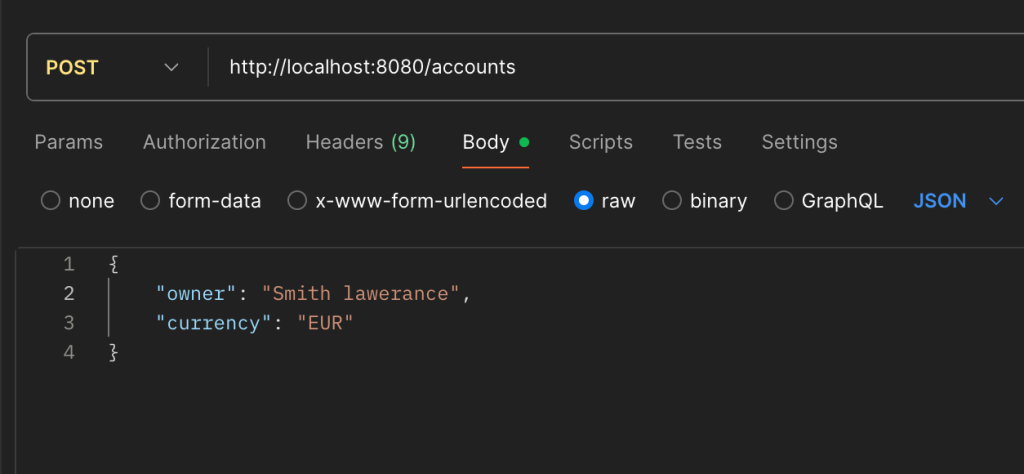
Now we can do the validaiton, In our account.go file for createAccount handler we had implemented validatorV10, we can test the validation in postman by passing wrong input or empty field to the ower and currency, it will respond with validation error.
Test error cases:
- Send invalid JSON.
- Omit a required field.
- Request a page size of 20.
5. Handler 2: Getting an Account – GET /accounts/:id
This handler retrieves a single resource by its ID, which is part of the URL path. Let add this function below our createAccount handler in api/account.go
// getAccountRequest defines the expected URI parameter.
type getAccountRequest struct {
    ID int64 `uri:"id" binding:"required,min=1"`
}

func (server *Server) getAccount(ctx *gin.Context) {
    var req getAccountRequest

    // Bind URI parameter
    if err := ctx.ShouldBindUri(&req); err != nil {
        ctx.JSON(http.StatusBadRequest, errorResponse(err))
        return
    }

    account, err := server.store.GetAccount(ctx, req.ID)
    if err != nil {
        if err == sql.ErrNoRows {
            ctx.JSON(http.StatusNotFound, errorResponse(err))
            return
        }
        ctx.JSON(http.StatusInternalServerError, errorResponse(err))
        return
    }

    ctx.JSON(http.StatusOK, account)
}
The ID is a URI parameter, we can’t get it from the request body as before, in Gin document we have BindUri, we use the uri tag to tell Gin the name of the URI parameter and we call the ShouldBindURI function of the context to bind all URI parameter into the struct. URI parameter binding with uri:"id"
uri:"id"– Tells Gin to extract the value of ID from the URL path parameter named “id”- Not from body – The ID comes from the URL itself, not the request body URL pattern – Defined in the route as
/accounts/:id(the:idis a placeholder) - ShouldBindUri function in getAccount extracts “123” from URL “/accounts/123” // and puts it into req.ID
Get Account of id 1 using postman
Method: GET URL: http://localhost:8080/accounts/1
Test error cases:
- Omit a ID field
- Use a negative ID.
Contextual Notes:
- URI parameter binding with
uri:"id" - Different error handling for “not found” vs “internal error”
- Input validation (ID must be positive)
- URI Parameters:
GET /accounts/:idindicates that:idis a variable part of the URL. Gin uses theuritag for binding these. sql.ErrNoRows: This specific error from thedatabase/sqlpackage indicates that no rows were found for the query. It’s crucial to handle this separately to return a404 Not Foundstatus, which is more informative than a500 Internal Server Error.
6. Handler 3. List Accounts API (with Pagination)
If we have large account in our database, we can use pagination to retrieve only limited data instead of returning them in a single API call.
The idea of the pagination is to divide the records into multiple pages of small size, so the client can retrieve only 1 page per API request. As this is different from get account via ID because we will not get input parameter from request body or URI but we will get the input from query string instead. Here is an example demonstrated in POSTMAN.
We have screenshot of gets accounts with pagination using Params instead of body and url
1. page_id param:which is the index number of the page we want to get, starting from page 1
2. page_size: Which is maximum number of records can be returned in 1 page.
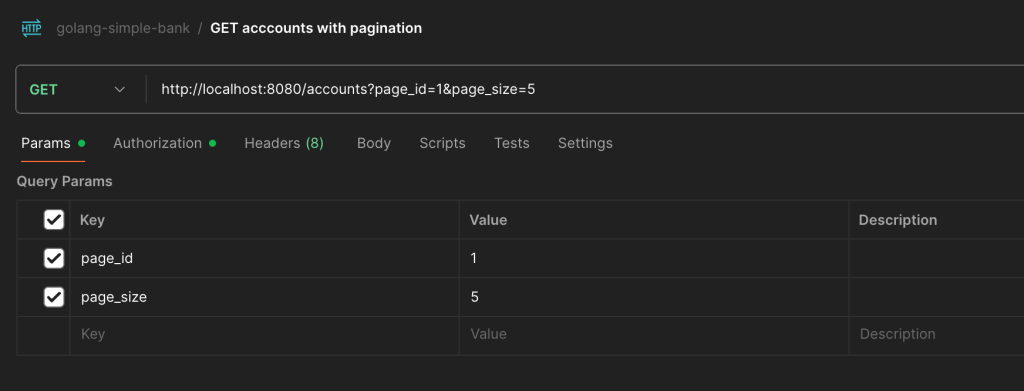
As in the request we can see that after accounts? the question mark is added before page_id and page_size that why it is called Query parameters. We already had added the API gets request for accounts in server.go and now let add gets accounts with pagination at the end of api/account.go file
As in request Query we can’t used uri as we used before get account by id in request struct, as we are not getting these params page_id and page_size from uri, but from teh query string instead. We need to change uri tag to form, read the gin bind query string. Both page_id and page_size can be fit into 32 big integer, so let used int32 data type.
// listAccountRequest defines the expected query string parameters.
type listAccountRequest struct {
    PageID   int32 `form:"page_id" binding:"required,min=1"`
    PageSize int32 `form:"page_size" binding:"required,min=5,max=10"`
}

func (server *Server) listAccounts(ctx *gin.Context) {
    var req listAccountRequest

    // Bind query parameters
    if err := ctx.ShouldBindQuery(&req); err != nil {
        ctx.JSON(http.StatusBadRequest, errorResponse(err))
        return
    }

    arg := db.ListAccountsParams{
        Limit:  req.PageSize,
        Offset: (req.PageID - 1) * req.PageSize,
    }

    accounts, err := server.store.ListAccounts(ctx, arg)
    if err != nil {
        ctx.JSON(http.StatusInternalServerError, errorResponse(err))
        return
    }

    ctx.JSON(http.StatusOK, accounts)
}
The function server.store.ListAccount need two argument context and argument. The args variable need two field Limit and Offset as shown in our code. Where offset is number of records database should skip and so we have to calculate it value from pageID and pageSize.
Pagination Logic:
Limit: Number of records per pageOffset: Number of records to skip = (page – 1) × page_size- Query parameters use
formtag
To run or test the accounts with pagination in POSTMAN.
- Method:
GET - URL:
http://localhost:8080/accounts?page_id=1&page_size=5 - Expected Response:
200 OKwith a list of accounts (up to 5). - Test Pagination: Change
page_idto2,3, etc., to fetch subsequent pages. - Test Invalid Parameters: Try
page_size=20(exceeds max) orpage_id=0to see400 Bad Requesterrors.
Then here, we should use another binding function: ShouldBindQuery to tell gin to get data from query string. If an error occurs, we just return a Bad Request status. Else, we call server.store.ListAccounts() to query a page of account records from the database. This function requires a ListAccountsParams as input.
If our accounts paginaiton have less data, we can generate random data. As we have make test command which we have create in one of previous tutorial to generate random test data,
Contextual Notes:
- Query Parameters:
GET /accounts?page_id=1&page_size=10uses query parameters (after?). Gin uses theformtag for binding these, andShouldBindQueryto process them. - Pagination: Essential for APIs that might return large datasets. It prevents overwhelming the client and improves performance by fetching only a subset of data. The
Offsetis calculated to skip records based on thePageIDandPageSize. emit_empty_slicesinsqlc.yaml: To ensure thatListAccountsreturns an empty slice ([]) instead ofnullwhen no records are found, configuresqlcwithemit_empty_slices: truein yoursqlc.yamlfile and regenerate your SQLC code (make sqlc). This provides a more consistent API response.
Test error cases:
- Request a page size of 20.
- Request not exist page_id 100.
Return {} for non exist rows instead of null for accounts list api pagination
Step 1:Set or add emit_empty_slices: true in root folder sqlc.yamlf file
The emit_empty_slices: true setting is related to how sqlc handles query results that have no rows, if not set or set to true then return null for no rows.This featured is added on sqlc version 1.5.O. If your current sqlc version is less then version 1.5.0 then if you are using mac then update the sqlc by running this command.
brew upgrade sqlcWhen you have a query that can return multiple rows (a :many query), this setting determines the output when there are no results:
emit_empty_slices: false(default): If the query returns no rows, sqlc will generate code that returns a nil slice. When this is
marshalled to JSON for an API response, it typically becomes null.emit_empty_slices: true: If the query returns no rows, sqlc will generate code that returns an empty slice (e.g., []YourModel{}).
When this is marshalled to JSON, it becomes an empty array []. Using emit_empty_slices: true is often preferred for API development because it ensures that a JSON response will always have an
array for a list field, even if it’s empty, which can simplify frontend logic by avoiding the need to handle null cases.
Once you add emit_empty_slices: true in root folder sqlc.yaml file then we need to run Sqlc to regenerate the code.
make sqlcThis command will does following
- Reads the SQL queries you’ve written in the db/query/ directory.
- Uses your sqlc.yaml file for configuration.
- Automatically generates the corresponding type-safe Go functions and structs into the db/sqlc/ directory.
Step 2: Following the step one will automatically initialized items to empty slice in db/sqlc/account.sqlc.go for ListAccounts function. Before the step one we had []Account then it will automatically change to this by completing the step 1 to items := []Account{}
func (q *Queries) ListAccounts(ctx context.Context, arg ListAccountsParams) ([]Account, error) {
	rows, err := q.db.QueryContext(ctx, listAccounts, arg.Owner, arg.Limit, arg.Offset)
	if err != nil {
		return nil, err
	}
	defer rows.Close()
.....
	if err != nil {
		return nil, err
	}
	defer rows.Close()
	items := []Account change to this  []Account{}
Conclusion
This tutorial covers the fundamental steps for building RESTful APIs with Gin, including server setup, routing, request binding, data validation, and proper error handling. You can now extend this foundation to implement more complex API endpoints for your banking service.